Server
Setup
main
| introduction
| installation | starting
chaos | configs |
| the weapons | items
& features
| koth | server
setup | credits |
|
|
main
| introduction
| installation | starting
chaos | configs | |
|
|
Server Packages: NOTE: All server admins must perform this step first! |
|
Go to your
UT2003/System folder, and open the UT2003.ini file, and in
the Engine.GameEngine section, add the following lines:
ServerPackages=MultiPickup Making sure there are no empty spaces at the end of each line. This will enable clients on your server to see the Chaos 'stuff'. |
|
Starting a ChaosUT2 Server: |
|
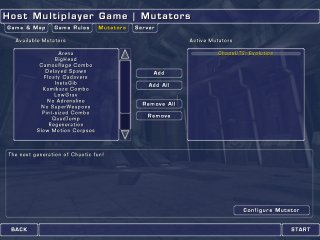
You can easily start a server running ChaosUT2 just as you would any other standard game of UT2003, simply by adding the ChaosUT2: Evolution mutator in the mutator selection menu. Clicking on the 'Configure Mutator' button will allow you to configure your various Chaos settings. |
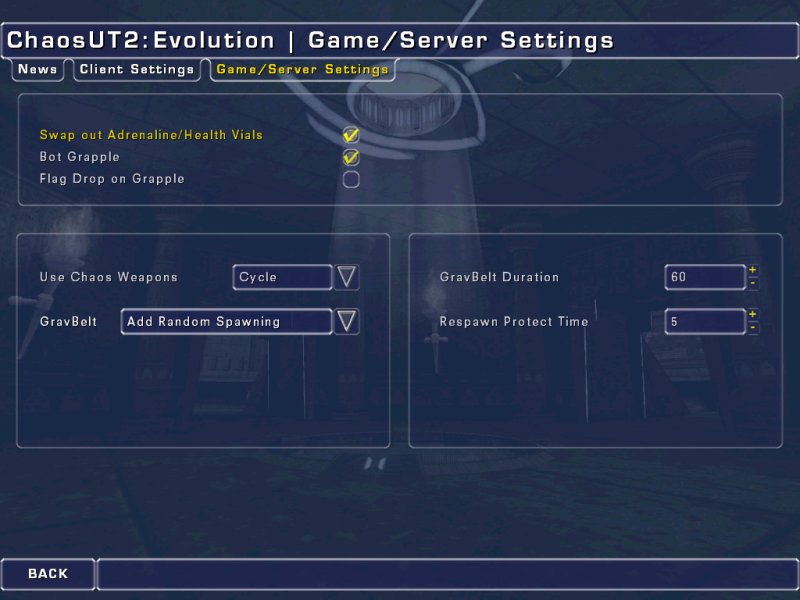
| Game/Server Setings: | |
|
|
Swap out Adrenaline/Health Vials - Checking this option will randomly swap out adrenaline pills and health vials with Chaos armor shards. Bot Grapple - Check this option if you want the bots to use the grappling hook. Flag Drop on Grapple - If you do not want players to be able to carry the flag while using the grappling hook, then check this option. The flag will be dropped automatically when the grapple is fired. Use Chaos Weapons - Choose 'Cycle', and the Chaos weapons will rotate with certain UT2 weapons. Choose 'Always', and the Chaos weapons will take the place of UT2 weapons for entire round. Choose 'Ignore', and you will get all Chaos features, w/o the weapons. GravBelt - Choose from 3 ways to implement the Chaos Anti-Gravity belt.
GravBelt Duration - Set the length of time the Anti Gravity Belt will last, unless recharged. Respawn Protection Time - Set the duration of respawn protection. |
|
Remote Web Admin: The Chaos settings are available to those who use the Remote Web Admin feature that comes with UT2003. |
|
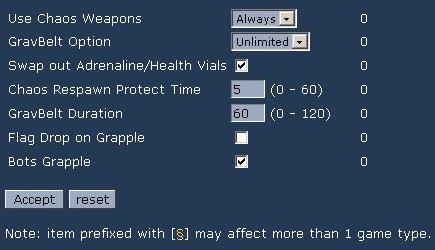
Under "defaults", simply click on "Chaos UT" on the left hand menu.
The menu that appears has the same options as outlined above.
|
| Command Lines: |
|
Sample CTF command line; C:\UT2003\System\UCC.exe server CTF-Lostfaith.ut2?game=XGame.xCTFGame?bAutoNumBots=True?difficulty=5?mutator=ChaosGames.ChaosUT?goalscore=7?timelimit=20? Sample DM command line; C:\UT2003\System\UCC.exe server DM-CE_ChaosDM1.ut2?game=XGame.xDeathMatch?bAutoNumBots=True?difficulty=5?mutator=ChaosGames.ChaosUT?goalscore=35?timelimit=20? Sample bat file to start a DM server (This will work for any UT2003 standard game type): c: cd \ut2003\system ucc server DM-CE_BioToxin.ut2?mutator=ChaosGames.ChaosUT Sample bat file to start a KOTH server: c: cd \ut2003\system ucc server DM-CE_BioToxin.ut2?mutator=ChaosGames.ChaosKOTHGameInfo Sample bat file to start a TeamKOTH server: c: cd \ut2003\system ucc server DM-CE_BioToxin.ut2?mutator=ChaosGames.ChaosTeamKOTHGameInfo |
Got Questions? Need help? The Chaos Team is available and actively supports this mod!
So for help with the game, news about future updates & new features, bug fixes, a Chaos discussion board, and everything else you might want or need to know about ChaosUT2: Evolution, don’t forget to check out our site at http//:www.planetunreal.com/chaotic
Or visit our IRC chatroom at
irc.chaoticdreams.org #chaoticdreams
|
main
| introduction
| installation | starting
chaos | configs | |
c'2003
Chaotic Dreams